DrekiTek Home Page

software that empowers your team

DrekiTek Home Page
English

Announcements 

2025-12-09

Our Holiday Hours

Closed -  December 24, 2025
Closed -  December 25, 2025
Closed -  December 26, 2025
Closed -  December 27, 2025
Closed -  December 28, 2025

December 29, 2025  OPEN 
December 30, 2025  OPEN 

Closed -  December 30, 2025
Closed -  December 31, 2025
Closed -  January 1, 2026
Closed -  January 2, 2026
Closed -  January 3, 2026
Closed -  January 4, 2026

2025-11-28

New Searching capabilities in ​DynaStar™ Web
 The DynaStar™ Maintenance Management System has always had great searching capabilities. DynaStar™ Web greatly enhances these capabilities.
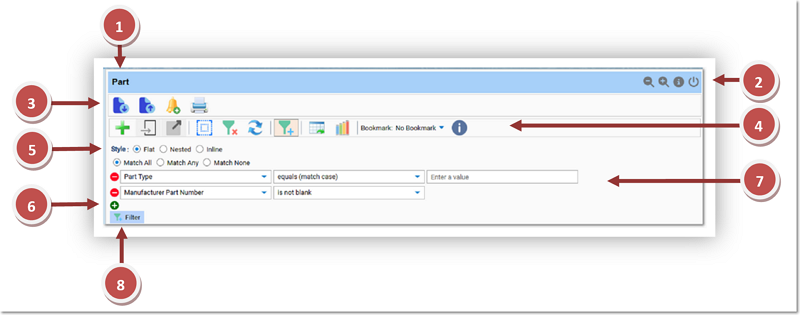
  1. Manager Title Row shows Name of the Manager
  2. Manager Title Row shows Application Menu Items  
  3. Manager Tool Bar Menu Items  
  4. Results Grid Tool Bar Menu Items  
  5. Search Style Choice  
  6. Add , Remove  Search Criteria
  7. Criteria Fields
  8. Run  Search Criteria

2025-11-26

It is about time we posted some screenshots of our new look and feel.

Flat Searching
Similar to the old client-server version but enhanced with: Match All | Match Any | Match None

Nested Searching
Unlimited Nested conditions

Inline Searching
Similar to the old client-server version but enhanced with "and not"

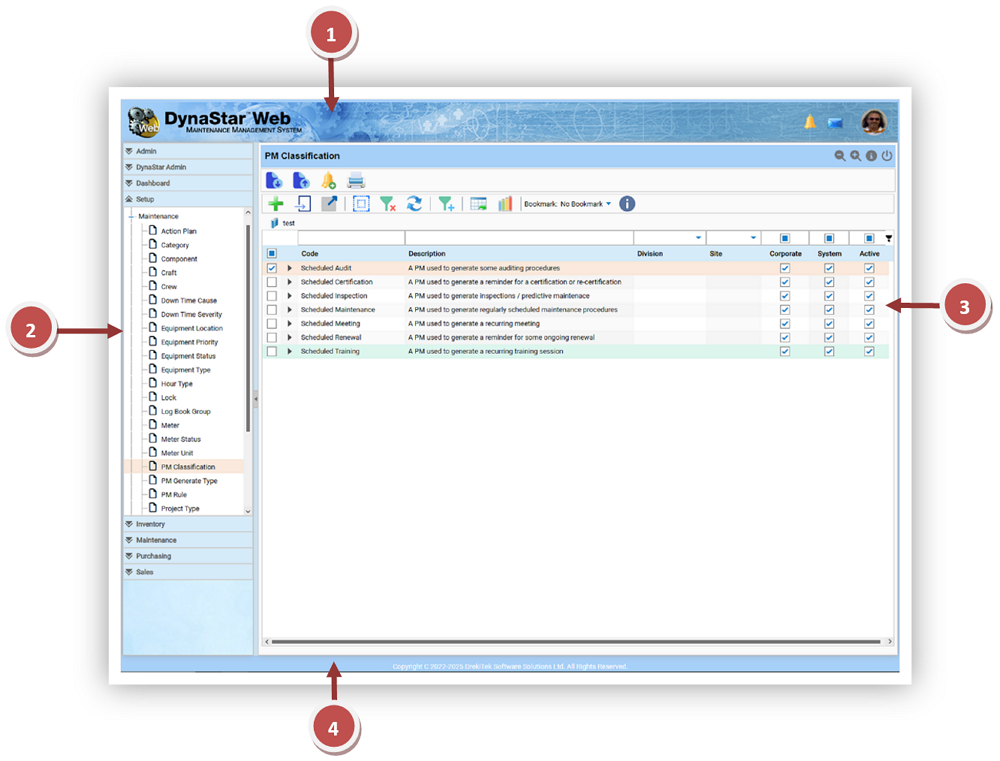
  1. Application Header.
  2. Application Menu.
  3. Manager Search Content.
  4. Footer.
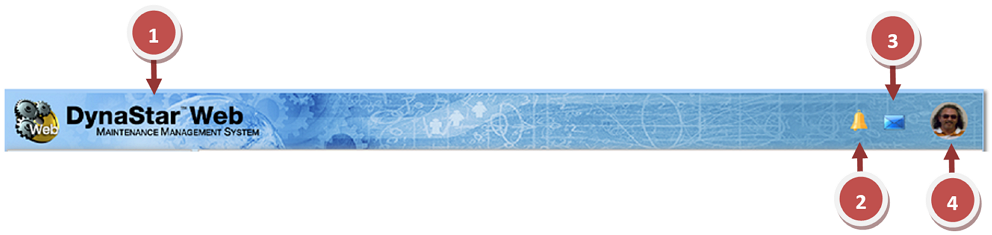
  1. Application Name.
  2. Count of unread notifications for the user, click to open.
  3. Count of unread mail for the user, click to open.
  4. User profile picture, click to open user's personal dashboard.

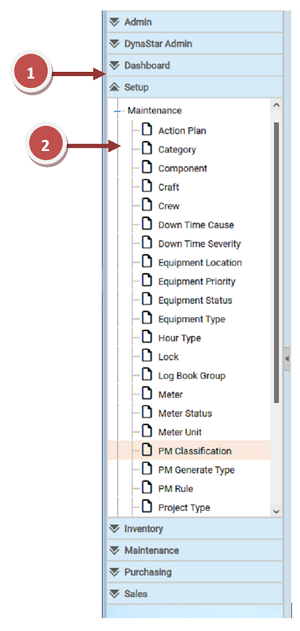
Menu Area
the menu slides in and out, scrolls up and down and has ajustable width. The Modules and Manager links that appear are dependent upon the permission a user has. A user will only see and have access to the items their permissions allow.

  1. Module, click / tap to expand
  2. Manager link, click / tap to open in the same window, or  right-click / tap and hold to open an item into a new browser tab.

Users can open any manager or record into its own tab. This allows users to have multiple Part, Requisition, Purchase Order, Work Request, Work Order, and so on, Screens open all at the same time, for better productivity.
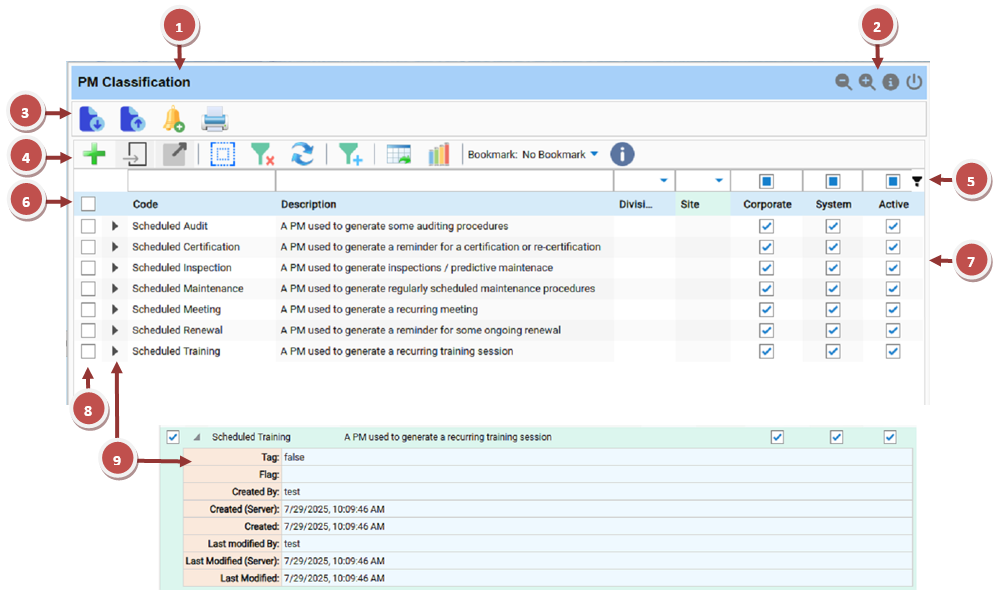
  1. The left side of the Manager Title Bar holds the Manager Name.
  2. The right side of the Manager Title Bar holds application buttons
  3. The Manager Tool Bar holds commands applicable to the user for the data in the Manager. Command buttons available are dependent on the functionality for the Manager and the permissions of the user.
  4. The Content Results Grid Tool Bar holds commands applicable to the Manager and searching for data.
  5. The Content Results Grid Filter Row allows filtering the data in the grid.
  6. The Content Results Grid Column Header Row displays the names of the data columns currently being shown on the grid. The grid will automatically be scrollable horizontally if more columns are added to the grid that do not fit in the current window sizing.
  7. The Content Results data resulting from a search in the manager.
  8. Select Item Check Box.
  9. Expand Row Arrow, expands the row to show all the data for the item in columns not currently displayed on the grid.

2025-05-26

We have updated our release estimates. We continue to thank you for your patience as we under go this re-write. Our initial feedback from some existing clients and future interested parties on the functionality and the new look and feel has been exceptionally good. We think all of our existing and future clients will be extremely happy with the new software and its capabilities. At this time we are estimating an initial pre-release that includes the Full Inventory and Maintenance modules around the end of this summer. We expect the full release before the end of this year.

Sneak Peak of some of the new screens will be coming next month:

DynaStar™ Web

  • We are completing testing of major costing logic for the Inventory and Purchasing Modules.
  • Fine tuned the Look and Feel and we are pleased to announce that we have the same functionality and the same look for screens for both the desktop and tablet modes of the software.

2025-03-31

We are pleased to announce we have added another new client to our existing DynaStar 4 Version of the software.​ The first of 4 plant sites with the second plant site to come on board within a couple of months.

2025-01-06

Happy New Year to everyone. We want to thank all of our existing clients for their continued business and wish everyone a safe, healthy, and prosperous year to come. We are progressing well with this major re-write of the software, but are still a bit behind schedule. We thank all of you who are patiently waiting for the new web-based version.

2024-10-15

We have installed our existing DynaStar 4 version of the software with another new forestry client. Three more sites to be onboarded over the course of the next year.

2024-09-15

We have hired the university student we had working for us over the spring and summer, and he is now a member of our development team.

2024-08-14

Updated sections of our website.

2022-12-01

New In-House development team begins training on our Secure Web Framework, and DynaStar™ Application Concepts, Features and Functionality.

2022-09-22

New Job Openings Posted.  

2022-09-10

Begin interviewing developers.

2022-09-09

Letter to DynaStar Clients, Users and interested parties.  

2022-09-06

Initial launch of new​ website with so​me details and sections still to come.

2022-09-06

DrekiTek™ Software Solutions Ltd. and USNR issue Press Release on the sale of the 
DynaStar™ Maintenance Management Software

2022-0​9-06

DrekiTek™ So​ftware Solutions Ltd. issues Press Release on the acquisition of the DynaStar™ Software. ​  

2022-0​9-02

We are looking to hire another Developer and Support Technician.

2022-09​-01

Our App Development Team begins the development of a new Mobile App for the existing DynaStar™ Software version that will run on both IOS and Android phones and tablets.

2022-08-31

DynaStar™ Maintenance Management Software Purchase Details finalized.

Industry Standard Reports

DynaStar™ Web offers a comprehensive set of industry-standard reports in all modules and for all managers. We can also create custom reports for you. And you can add your own reports too.