
software that empowers your team

software that empowers your team


(Only users that belong to the Administration Role can see the Security Manager)
1. Click the Admin Module tab.
2. Click the Security Manager
3. In the All Roles area of the Security Manager, single click the Role to highlight the Role to delete.
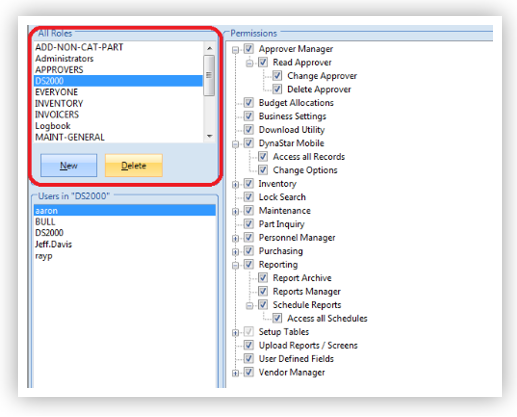
4. Click the Delete button in the All Roles area to actually delete the Role.
IMPORTANT
DynaStar™ comes with pre-defined roles. An Administrator can edit the pre-defined roles or delete them and add their own. The only Role that should not be deleted is the Role called Administrators. If the Role named Administrators is deleted it will require a DynaStar™ Support Specialist to add the Role back in. Without this Role, an administrator of DynaStar™ will not be able to Administrate DynaStar™.
