
software that empowers your team

software that empowers your team


The DynaStar™ Security Manager sets the permissions Users have within the application. DynaStar™ Security is based on Roles and Permissions (Role Based Access Control) Roles are created and given a set of permissions. Users that log into DynaStar™ are assigned to one or more Roles. A User receives the combined permissions of all the Roles they belong to.
(Only users that belong to the Administration Role can see the Security Manager)
1. To access the Security Manager, click the Admin Module tab, then
2. Click the Security Manager
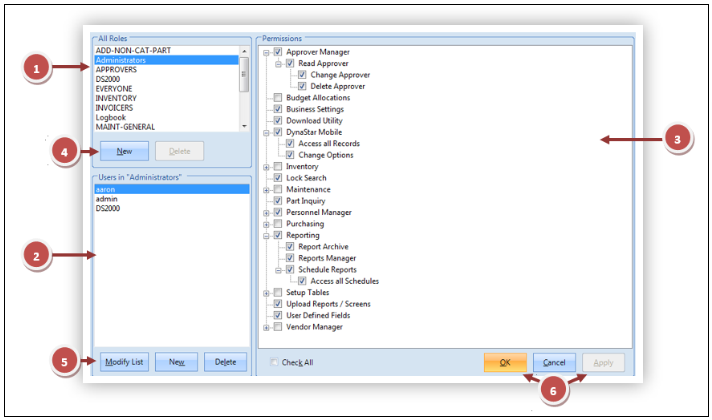
1. The Role section
2. The Role Users section
3. The Role Permisions section
4. Action Buttons for Roles
5. Action Buttons for Users
6. Action Buttons for Permissions
