
software that empowers your team

software that empowers your team


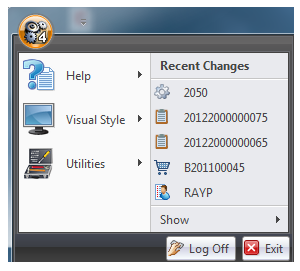
The App (application) Menu, also known as the DynaStar™ button is accessed by clicking on the DynaStar™ Icon in the top left hand corner of the screen. The App Menu has other features and functions not accessible through the Modules.
The Title Bar identifies the screen as the DynaStar™ screen (middle in screenshot below) and contains the basic screen managment buttons of minimize, maximize and close on the top far right hand corner of the screen.

