software that empowers your team

software that empowers your team


Grid columns can be sorted alphabetically, numerically or alphanumerically, depending on the contents of the column. Grids can also be sorted by multiple columns. DynaStar™ stores each grid setting on a user-by-user basis. How one user sorts their grids, does not affect another user. Each user has their own grid preferences for each grid in the application.
Sorting a grid by one or more columns is done, simply by Clicking on a Column Header. When a Column Header is Clicked, the grid will be sorted alphanumerically by that column, in ascending order. Clicking the same Column Header again will change the sort to descending order.
To sort by another column, Press Shift and Click on another Column Header.
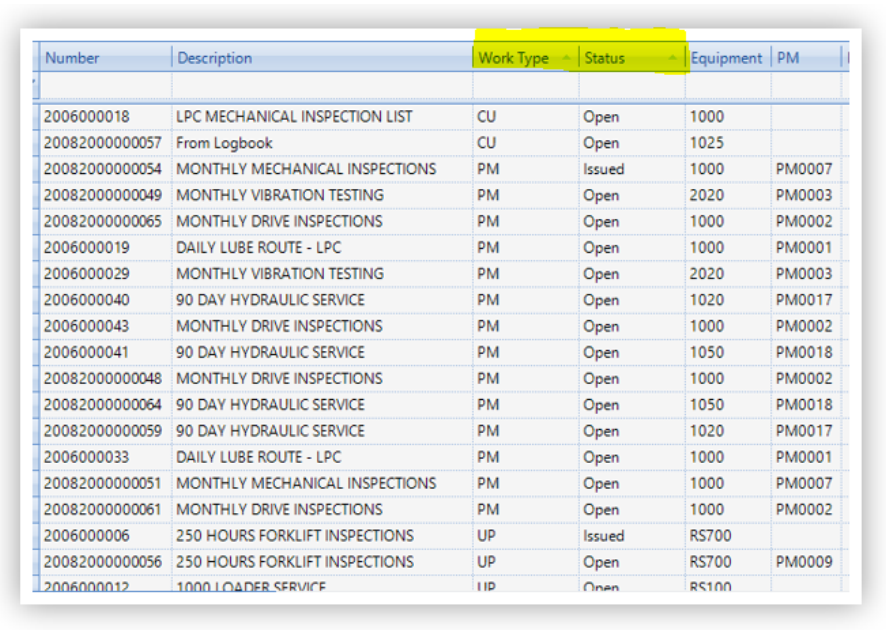
A column that is used for sorting the grid will have an arrow on the right hand side of the column header. If the arrow is pointed upwards, the column is sorted in ascending order. If the arrow is pointed downwards, the column is sorted in descending order.
If a column:
1. starts with letters, the records are sorted A-Z or Z-A
2. starts with numbers, the records are sorted numerically from low to high or high to low
3. starts with both letters and numbers, the records are sorted by number first then by letters
The example below shows that the grid is sorted by Work Type, then Status and both are sorting in ascending order. Notice how the items in the Status column are sorted alphabetically for each alphabetical grouping in the Work Type column.