
software that empowers your team

software that empowers your team


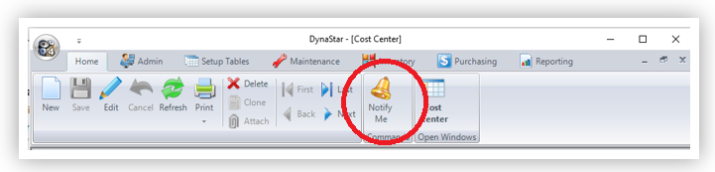
There are two ways to add notifications depending on the Manager. Managers without search tabs may have a Notify Me button, Managers with search tabs will have an Add Notification Button.
To add a new notification:
1. Create the Notification.
Using the Add Notification Button on a Search Tab
When using the Add Notification Button the user needs to first specify the search criteria to be used to find the data to be notified about. For example to be notified everytime a Work Request is entered for a specific equipment, use the Work Request Manager.
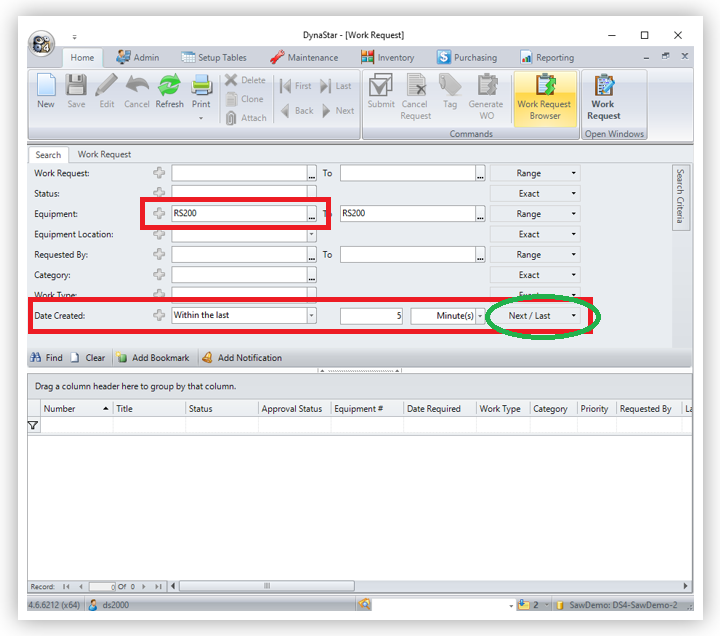
Adding a time restriction to the notification is important, so the notification is not repeatedly sent. We generally recommend using 5 or 10 minutes as the restriction. The Notification Utility runs constantly on the server and is always checking to see if changed data matches the criteria for a notification and then sends out the notification. When a time restriction is placed on the notification then the match only occurs briefly and the notification does not repeat. In the example above if only the equipment number was used, and there were 100 already existing records even if already created, the search data would match and the recipients would be notified about each and everyone. With the time restriction, in this case Date Created, only new records entered, or records created within the last 5 minutes of the notification utility search, will be notified on.
Using the Notify Me Button on the Toolbar
When using the Notify Me Button, no search
criteria needs to be entered. The system will automatically notify the user on
ALL changes to the data, on that tab, in that Setup Table / Manager.
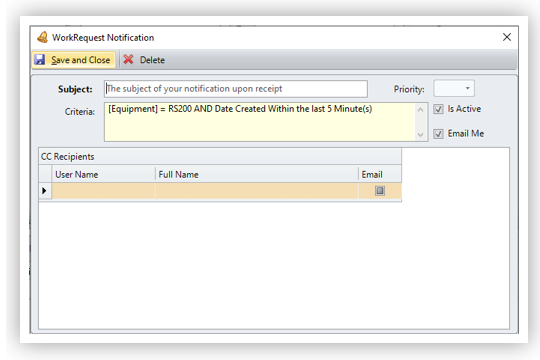
2. Add the Title and the Recipients.
In the Notification window enter the following information:
IMPORTANT
The user creating the notification rule should NEVER be listed as a CC Recipient of the notification.
3. Click the SAVE and Close button when finished.
