software that empowers your team

software that empowers your team


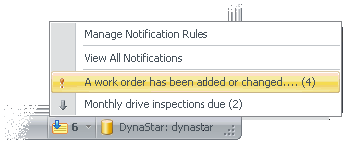
DynaStar™ displays the current count of new (unviewed) notifications that apply to each user in the bottom right hand corner of the Main Window.
To Access the Notification Menu and to View Notifications:
1. Click the notification button.
A list of notification rules that have
one or more unviewed notifications is displayed, along with the number of
unviewed notifications in parentheses.
2. Either:
 Click on one of the rules displayed to show a list of notifications for that rule, or
Click View All Notifications to show a list of all notifications, grouped by rule.
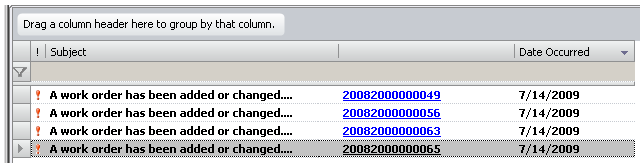
3. A list of the notifications is shown. Unviewed notifications are shown in bold.
Click the blue link to view the database record that that triggered the notification. When you view the record for an unviewed notification, the notification count deceases by one.