
software that empowers your team

software that empowers your team


As DynaStar™ organizes equipment in a hierarchical structure (like a tree with branches), the Equipment Pick List has a Hierarchy Search option in addition to the regular Pick List capabilities.
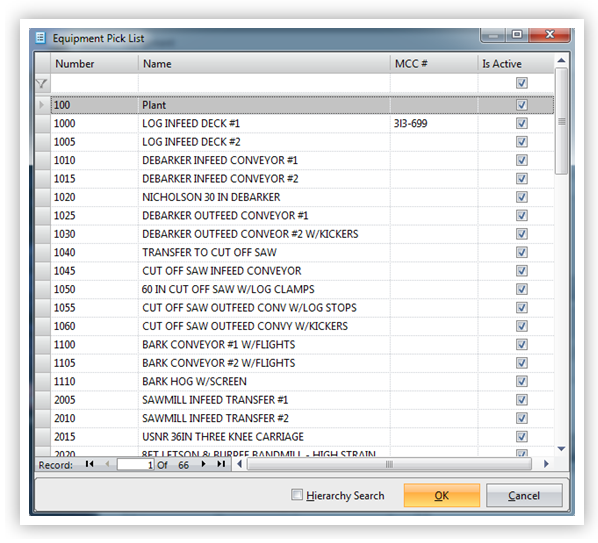
When the Equipment Pick List is opened the very first time by a user, the records are just listed alphanumerically in a long list. See the example below.
Selecting the [ ] Hierarchy Search checkbox at the bottom of the Pick List will change the view to the Hierarchical Search View, that consists of a tree view of the equipment locations and their equipment.
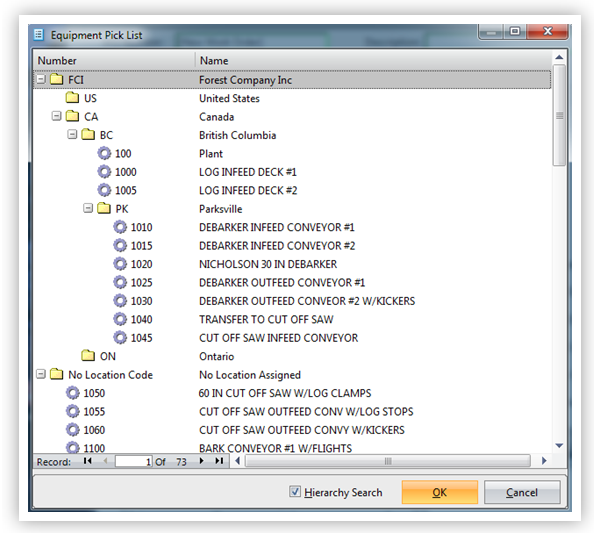
Any folder with a plus sign beside it contains at least one more folder inside it. To see the contents click the plus sign to expand the folder's contents.
Double click an entry with the Gear symbol to select a record, or
Single click the entry with the Gear symbol, then click OK to select the record.
If the equipment pick list is in Hierarchical Search Mode, when closed it will automatically open in Hierarchical Search mode the next time a user opens it.
