
software that empowers your team

software that empowers your team


The toolbar or command buttons for each Manager are located on the Ribbon under the Home Tab. Each Manager may have custom command buttons available only to that Manager, and when they do they appear to the right of the basic buttons available to all Managers, which are shown below.
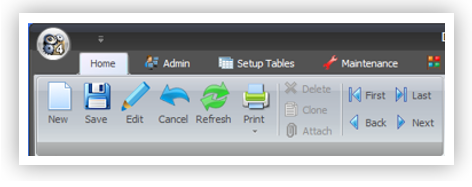
| Click this button | To |
|---|---|

|
Add a new record |

|
Save a record |

|
Edit a record |

|
Undo changes to a record |

|
Refresh / Update the record(s) displayed on the screen |

|
Print a record |

|
Attach a file to a record |

|
Clone a record |

|
Move to the first record in the current record set |

|
Move to the previous record in the current record set |

|
Move to the next record in the current record set |

|
Move to the last record in the current record set |
